Issues
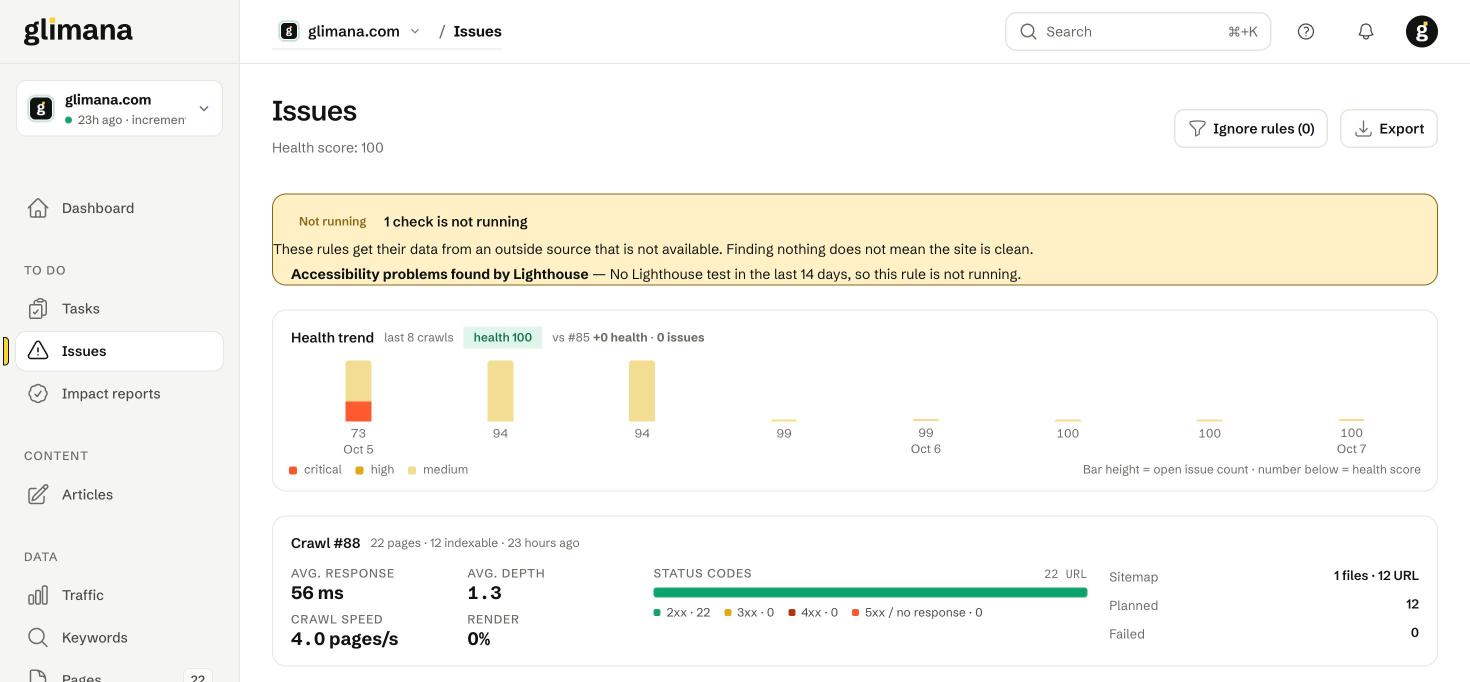
Issues are what the crawler and the rules engine found. The Tasks page is the curated, ranked version; the Issues page is the complete inventory, grouped by rule.
Health score
Health is 0–100 and comes only from open crawl issues: each open issue is weighted by severity (critical 10, high 5, medium 2, low 0.5, info 0) and scaled by the number of indexable pages, so a 3,000-page site with ten medium issues scores the same as a 300-page site with one. Informational issues never lower the score — they are there so you can decide, not because Google penalises them.
The health trend shows the last crawls as bars (bar height = open issues, number = health score, colour = worst severity present). The label "vs #85 +0 health · +3 issues" compares the newest crawl with the first bar.
Crawl summary
The second card describes the crawl the issues come from: pages fetched, indexable pages (the base for every percentage in Glimana), average response time, average click depth, crawl speed, render share, status-code mix, sitemap files and URL count, pages planned for the next incremental crawl and failed fetches. A note under it explains where any 4xx URLs were found when they have no inbound link on the site.
Category tabs
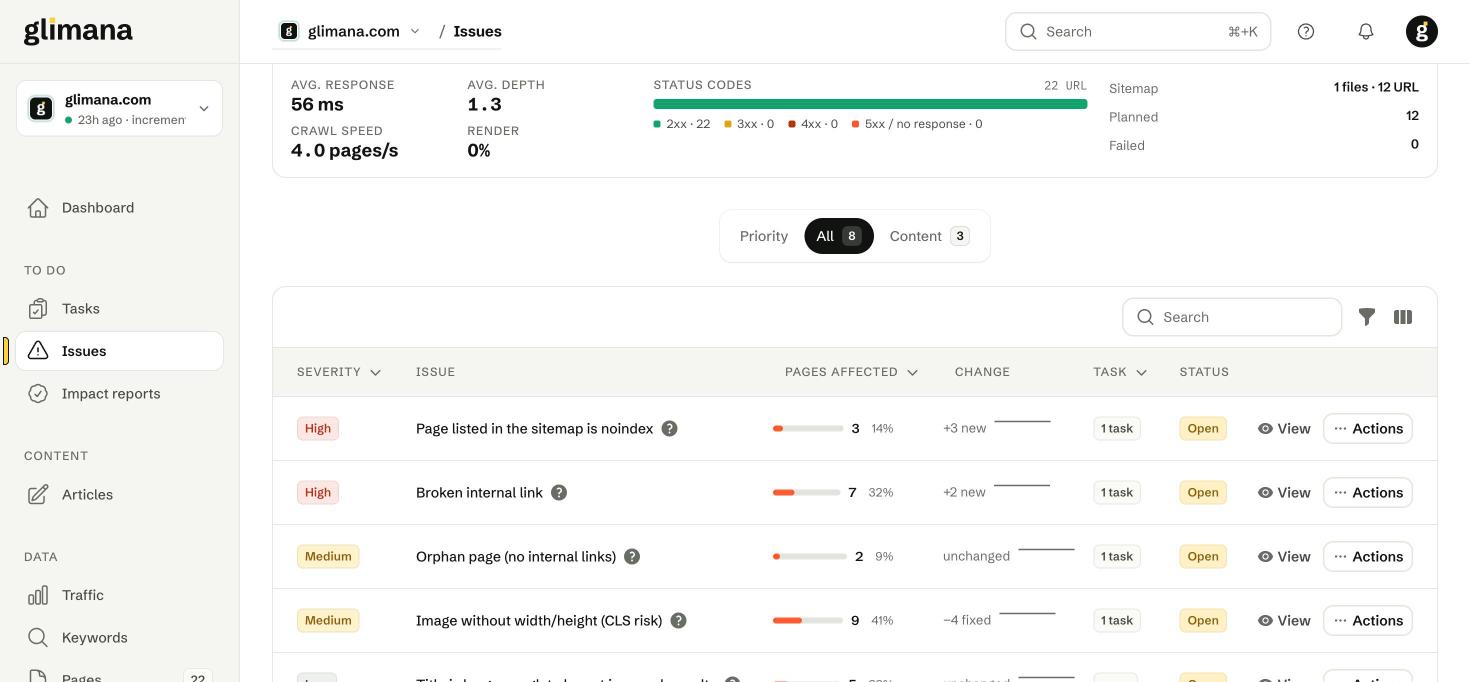
Priority shows critical and high issues; All shows everything open; the category tabs (Indexability, Content, Links, Images, Performance, Structured data, Security, International, Mobile, Accessibility, AI access) filter by rule family; Ignored lists rules you muted. Numbers in the tabs are open rule groups, not pages.
The table
| Column | Meaning |
|---|---|
| Severity | Critical, High, Medium, Low, Info — set per rule, see the issue guides. |
| Issue | The rule name. The ? opens "Why it matters". |
| Pages affected | Count and share of indexable pages, with a bar. |
| Change | New and fixed pages since the previous crawl, plus a sparkline of the last crawls. |
| Task | Whether a task exists for this rule on this site. Info rules and rules with no affected clicks usually have none. |
| Status | Open, or the date it was last seen if it has cleared. |
View opens the issue detail with the affected URLs, the evidence captured for each (for example the canonical found, the status code, the redirect target), export, and a link to the guide. Actions lets you ignore the rule for this site, open the task, or re-crawl the affected pages now.
"Not running" banner
Some rules depend on an outside source — Lighthouse for accessibility, CrUX for Core Web Vitals, Search Console for "crawled but not indexed". When that source has not delivered in its window, the rule is marked not running and a banner lists it. A rule that is not running finds nothing, and the banner is there so that "nothing found" is not read as "clean".
Ignore rules
Ignoring a rule hides it from the score, the list and the task list for this site. Use it for things you have decided on purpose — a staging subdomain that is noindex, an intentional redirect chain through a tracking domain. Ignored rules are listed under the Ignored tab with a reason; if the rule later finds nothing, it is marked "no longer seen" and drops to the bottom. Ignore rules are per site.
From issue to task
An issue becomes a task when the rule has a fix worth doing: all critical and high rules, medium rules on pages with clicks, and site-level rules. Low and info rules stay on the Issues page unless you add a custom task. Each rule produces one task covering all its affected pages ("Image without width/height — 14 pages"), so the task list stays short even on large sites.
Export
Export at the top downloads the current tab as CSV with one row per rule; the issue detail exports one row per affected URL with its evidence.