Articles
The writer produces long-form articles grounded in your Search Console data and in sources it opened and verified. It runs on your AI keys, with a flat Glimana fee of $1.00 per article taken from a prepaid wallet. Everything else in Glimana is included in the plan; this is the only metered feature.
Keys and wallet
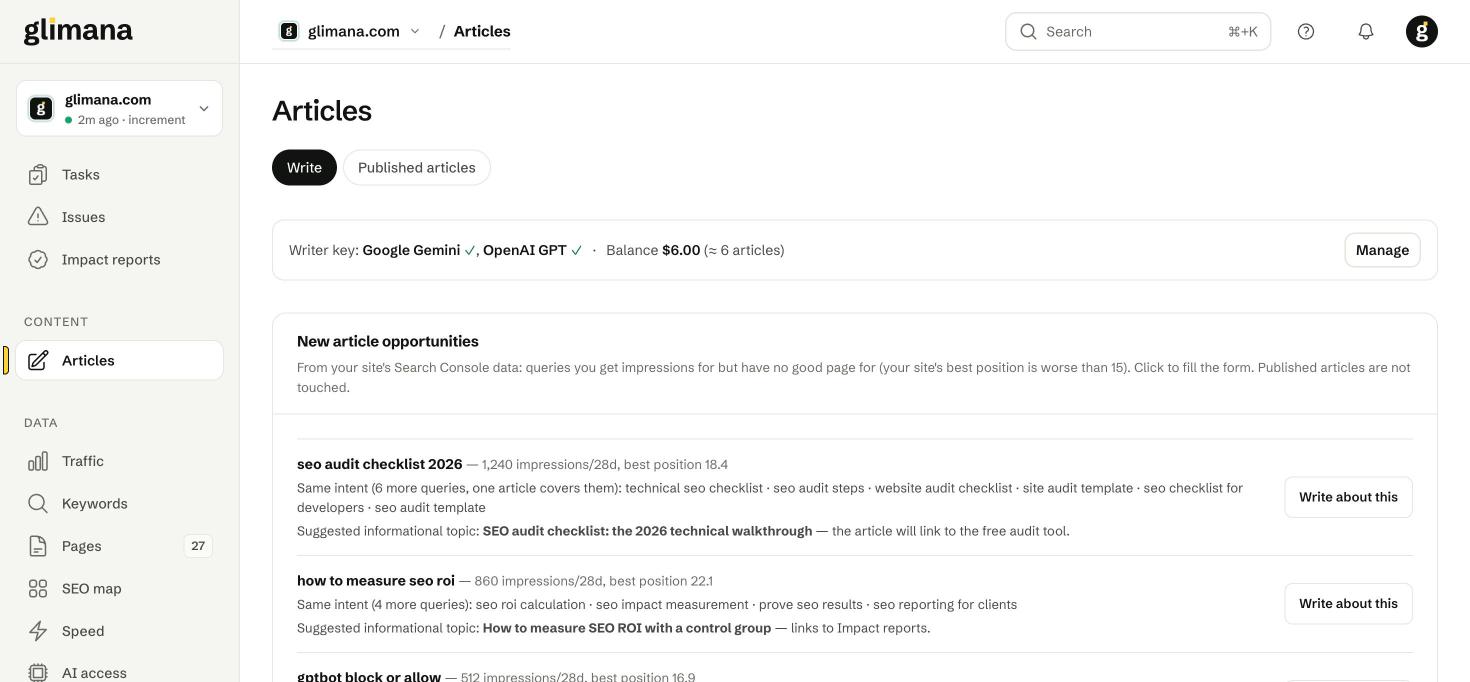
The status line at the top shows which writer keys are set (Google Gemini, OpenAI GPT) and the wallet balance. Manage opens the dialog to paste keys, pick the default writing model and top up the wallet (USDT; card payments are coming). Keys are stored encrypted and used only for your own articles; model and search costs are billed by the provider to your account, not through Glimana.
A failed generation (for example the provider's quota is exhausted) refunds the $1 automatically and tells you why.
Article opportunities
Glimana scans the site's queries for topics where you get impressions but have no good page — your best position for the query is worse than 15 — and groups queries with the same intent so that one article covers the cluster. Each card shows the head query, impressions in 28 days, the queries that share its intent, the page that currently ranks (and a warning when that page is a tool or calculator, because an article on the head term would compete with it) and a suggested informational angle that links to the tool instead of replacing it. Write about this fills the form below. Published articles are never touched by this list.
Brand voice and author bio
Brand voice is a style card — form of address, tone, sentence length, phrases to use and avoid. Extract from my site reads your most-read articles and drafts the card (style only, not content; the API cost goes to your key); edit it freely. Left empty, it is not used. Author bio is appended to every article as an expertise signal (E-E-A-T) for Google and AI search.
The new-article form
| Field | What it does |
|---|---|
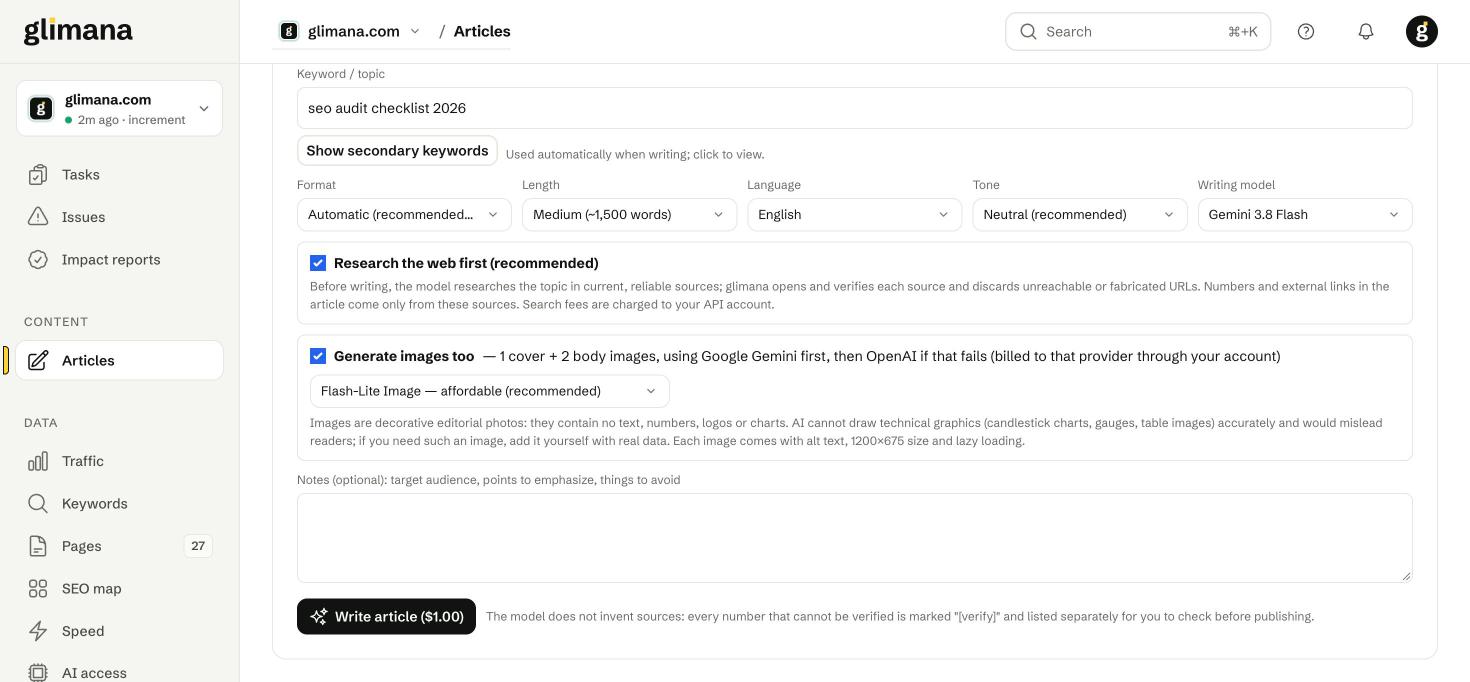
| Keyword / topic | The head term. Glimana adds the real Search Console queries on that topic and the internal pages worth linking as context for the model. |
| Secondary keywords | Shown on request; used automatically. |
| Format | Automatic (recommended) or a fixed shape: guide, listicle, comparison, FAQ page, news. |
| Length | Short (~800), Medium (~1,500), Long (~2,500 words). |
| Language / Tone / Writing model | Defaults come from the site settings; the model list depends on which keys you added. |
| Research the web first | The model collects current sources; Glimana opens each one and discards any that is unreachable or fabricated. Numbers and external links come only from surviving sources. Search fees are charged to your API key. |
| Generate images too | One cover and two body images (Gemini first, OpenAI as fallback). Images are decorative editorial photos with alt text, 1200×675 and lazy loading; the model is not asked to draw charts or data graphics because it cannot do so accurately. |
| Notes | Audience, points to emphasise, things to avoid. |
Drafts, quality gate and verify markers
Each draft appears in the Drafts list with a status: Ready, Error (with the provider message and the refund note) or Published. Opening a draft shows the article, the generated images, a Research tab listing the sources with the gate result ("8 sources · gate 33/35"), Versions (every regeneration and edit is kept) and the actions Copy Markdown, Copy HTML, Load settings into form, Send to site and Delete.
The quality gate runs up to 38 checks before a draft is marked ready: heading structure, a single H1, intro answer block, no placeholder text, every external link reachable, every number traceable to a source, internal links resolve, image alt text, schema validity, length within range, no duplicate paragraphs, language matches the setting, and more. Two optional checks may fail without blocking.
The model is told never to invent sources. Any number it cannot tie to a source is written as [verify: …] and listed separately on the draft. The draft card shows "N to verify"; copying or sending a draft with open markers warns you but does not stop you — the markers are your to-do list before publishing.
Publishing
Send to site uses the site's publishing connection. Images are uploaded to the media library with the cover set as the featured image; the article is created as a draft unless the plugin on your site allows immediate publishing. The Published articles tab lists everything sent, with the live URL and the date.
If you publish by hand, Copy HTML or Copy Markdown gives you the article with internal links already in place; download the images from the draft and upload them under the same file names so the references resolve.
Refreshing an existing page
A content-decay task on an article page offers Refresh with the writer. The draft is marked "Refresh of a published page" with the URL; it keeps the page's structure, updates facts from fresh sources, and is meant to replace the text at the same address. Paste the new text over the old one (images and embeds on the page are not part of the draft, keep them), then mark the task done so the 28-day impact window starts. Glimana keeps only one open refresh draft per page.
Articles count toward site reputation
Google's 2026 spam updates treat scaled, off-topic content as a site-level signal. The opportunity list only proposes topics your site already gets impressions for, and the writer refuses topics that have nothing to do with the site's sections. Keep it that way: a tool site does not need trading guides.