Impact reports
Most SEO tools stop at "we found 40 issues". Glimana keeps going: every task you mark done is checked, and content work is measured against pages you did not touch, so you can tell your own gains from the tide.
Two kinds of verification
Technical tasks (anything found by the crawl) are verified by a re-crawl of the affected pages a few hours after you mark the task done. The result is binary per page — fixed or still there — and the task closes only when every page is clean. Partly fixed tasks go back to New with the remaining pages listed.
Content tasks (decay, cannibalization, article opportunities, refreshes, custom tasks) are measured with Search Console:
- Before window — the 28 days ending the day you marked the task done.
- After window — the 28 days starting the next day. Search Console publishes with a 3-day delay, so the measurement runs on day 31.
- Control group — up to 20 pages of the same site, in the same section where possible, with a similar click level in the before window, that had no open task and were not changed in the after window.
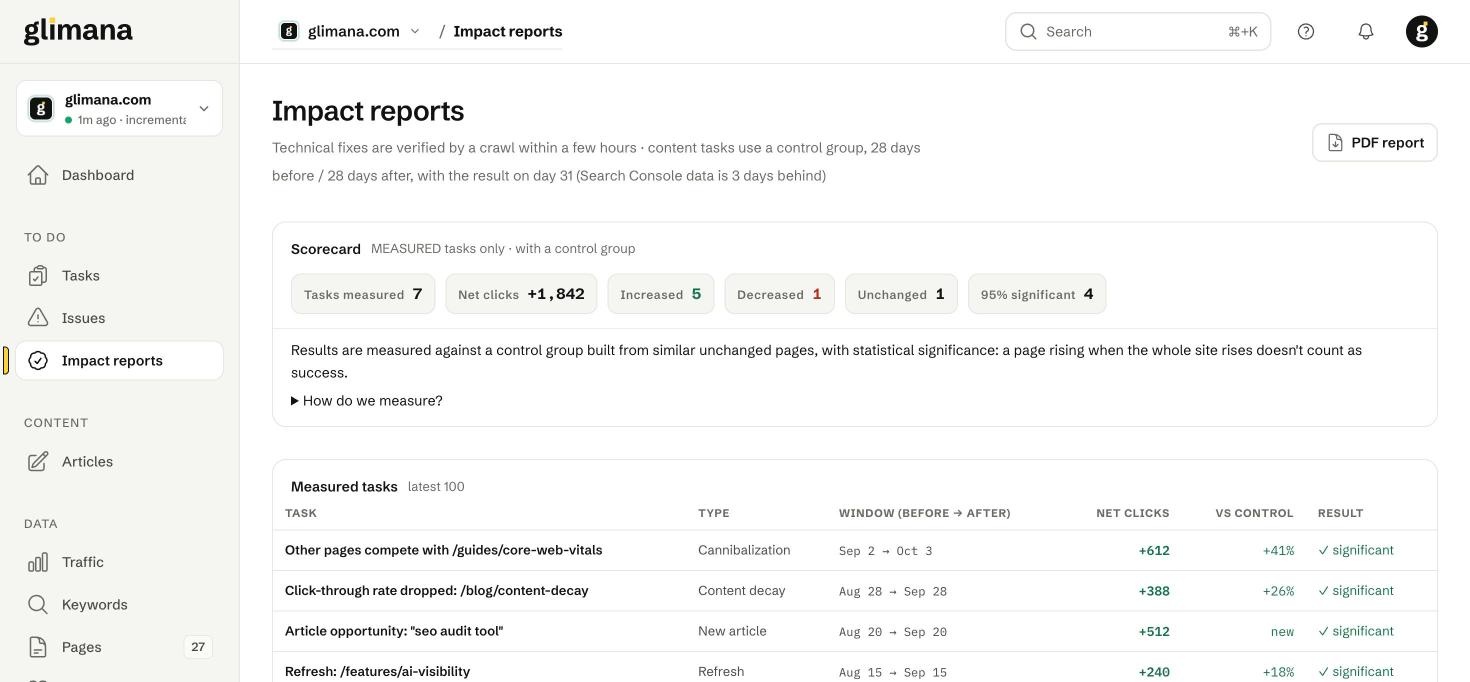
- Result — the task's pages' change in clicks, minus the control group's change. If the site rose 20% and your page rose 22%, the measured impact is +2%, not +22%.
- Significance — a two-sample test on daily clicks; "✓ significant" means p < 0.05. Small pages rarely reach significance even when the direction is right; the number is still shown, just without the tick.
The scorecard
Tasks measured · Net clicks (sum of measured changes, control-adjusted) · Increased / Decreased / Unchanged (direction after adjustment) · 95% significant. Only measured tasks count — not the ones you marked done yesterday, not the ones that closed on their own.
Sections of the page
- Measured tasks — the latest 100, with type, window, net clicks, change vs control and the significance mark. Click a row for the daily series and the control pages used.
- Not measurable — measurement ran but could not produce a result, with the reason: no Search Console rows for the page, the page was deleted or redirected, a crawl could not reach it, or there were not enough similar pages for a control group. The task is closed as not measurable; it is not counted as a success or a failure.
- Resolved technical issues — crawl-verified fixes in the last 90 days: when you marked it done, when the crawl confirmed it, and pages fixed out of pages affected.
- Self-resolved — tasks that closed because the issue stopped appearing before anyone marked them done. They are recorded, not measured, because nobody claimed the work.
- Awaiting measurement — tasks in the window, with the date the result is due.
Monthly PDF
The numbers on this page are also the body of the monthly PDF report: on the 1st of each month at 09:00 (your time zone) one PDF per site is emailed to the alert address, and to Telegram if connected. The dashboard's PDF report button produces the same document on demand. Turn the monthly email off under Account → Notifications.
What impact reports cannot do
They measure clicks, not rankings or revenue. A fix that improved a page's position from 14 to 9 with no click change shows as unchanged. For position movement, look at the Keywords screen for the page's queries.